Learning table tennis is easier when you can practice consistently, even without a training partner. The best table tennis robots for beginners make solo sessions more structured by repeating serves, returns, and basic strokes at adjustable speeds and spins.
This roundup compares 10 training robots across simple starter machines, recycling models, and app-controlled systems. We focus on setup, control options, ball capacity, drill variety, and how well each machine supports steady skill development.
Best 10 Table Tennis Robots for Beginners Picks for 2026
Best Lightweight Starter
Vbestlife Automatic Table Tennis Trainer

- One-switch automatic ball launching
- Lightweight 664-gram portable design
- Includes 10 balls; runs on four AA batteries
Best For: Beginners and children wanting simple indoor solo practice
Best Remote-Controlled Practice

- Wireless remote for on-table adjustments
- Adjustable spin, frequency, and head position
- Requires tables under 2.5 inches thick
Best For: Learners wanting customizable drills and remote operation
Best Adjustable All-Rounder

- Wireless remote controls practice changes
- Adjustable speed, frequency, direction, and spin
- Feeds 30 to 70 balls per minute
Best For: Beginners seeking varied drills without app setup
Best Kids' Practice Launcher
Portable Table Tennis Serve Machine

- Beginner- and child-friendly design
- Feeds one ball every four to six seconds
- Portable ABS launcher includes 10 balls
Best For: Children and families starting basic solo practice
Best Starter Pick
iPong Original Table Tennis Trainer Robot

- Adjustable topspin and underspin
- 12–70 balls per minute
- Holds up to 110 balls
Best For: Beginners seeking simple solo practice
Most Spin Variety
Ping Pong Robot with 36 Spin Options

- 36 spinning-ball combinations
- Supports topspin, backspin, and sidespin
- Requires 40 mm balls and at least 15 balls
Best For: Beginners learning to read varied spin
Best Recycling Setup
Suz S201 Robot with Net and 200 Balls

- Includes recycling net and 200 balls
- Adjustable spin, speed, and oscillation
- Fits tables under 2.5 inches thick
Best For: Beginners wanting longer drills with less ball pickup
Most Customizable

- 522 preset drills plus custom programming
- App and remote control with detailed adjustments
- 150-ball capacity and nine spin types
Best For: Beginners seeking extensive training customization
Best Simple Starter

- Arrives assembled for quick setup
- Includes 20 ABS training balls
- Wireless operation and compact 2.2-pound design
Best For: New players wanting uncomplicated basic practice
Best for Guided Progression
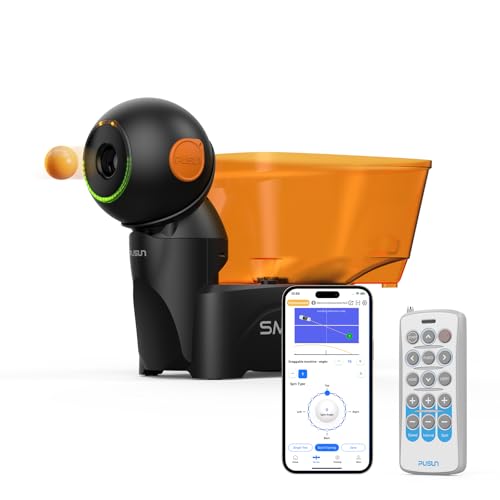
- More than 200 preset training drills
- Triple-motor system for stable serving
- App and remote control with custom settings
Best For: Beginners who want structured drills and room to advance
Best Lightweight Starter – Vbestlife Automatic Table Tennis Trainer
For shoppers comparing table tennis robots for beginners, the Vbestlife is a straightforward, portable option for solo practice. It automatically feeds balls, runs on four AA batteries, and includes 10 balls, making it easy to start basic return and reaction drills without complicated controls.
Best For: Beginners, children, and casual indoor practice where portability and simple operation matter most.
Pros:
- One-switch operation is easy for new players.
- Lightweight 664-gram design is convenient to carry.
- Wide ball exit is designed for smooth, jam-resistant feeding.
- Includes 10 practice balls and requires four AA batteries.
Cons:
- Designed for indoor use according to the listed specifications.
- Offers a simpler feature set than robots with adjustable spin, speed, or oscillation controls.
The Vbestlife makes sense when the priority is accessible, no-fuss practice rather than advanced customization. Its compact build and included balls suit first-time users who want to begin training quickly.
Best Remote-Controlled Practice – Suz S102 Table Tennis Robot
The Suz S102 is one of the more adjustable table tennis robots for beginners, but it requires careful setup. Its wireless remote supports drill changes involving spin, frequency, and head positioning, while the robot is intended to provide solo practice when a partner is unavailable.
Best For: Beginners who want room to experiment with spin and serve placement and are comfortable following setup instructions.
Pros:
- Wireless remote allows practice adjustments from the other side of the table.
- Adjustable robot head supports direct or indirect serves.
- Settings can be used to work on topspin, backspin, frequency, and oscillation.
- Manufacturer states that normal-wear replacement parts are covered for one year.
Cons:
- Only fits tables less than 2.5 inches thick.
- The machine may require troubleshooting if the ball supply, USB connection, or settings are incorrect.
- At least 20 balls should be available in the storage tube for proper serving.
The S102 offers more practice control than a basic launcher, but its table compatibility and setup requirements deserve attention. It is a better fit for buyers willing to spend time tuning the machine rather than seeking the simplest possible starter robot.
Best Adjustable All-Rounder – iPong V300 Training Robot
The iPong V300 is a versatile choice among table tennis robots for beginners who want controls they can continue using as their skills develop. Its wireless remote adjusts ball frequency, speed, direction, and spin, and the machine can deliver from 30 to 70 balls per minute.
Best For: Beginners, families, and players who want adjustable solo drills without app-based setup.
Pros:
- Remote control works from the opposite side of the table.
- Adjusts ball frequency, speed, direction, topspin, and backspin.
- Feeds up to 70 balls per minute, with a slower 30-ball setting available.
- Quick assembly requires attaching the feeder, with no app download needed.
Cons:
- At 3.1 pounds, it is less lightweight than the compact 664-gram launchers listed here.
- The supplied information identifies the main product as the included component, so extra accessories may be needed depending on the setup.
With broad adjustment options and simple assembly, the V300 can support both introductory repetition and more varied drills. It is especially appealing if you want a beginner-friendly robot that does not become limited to one basic feed pattern.
Best Kids' Practice Launcher – Portable Table Tennis Serve Machine
This portable serve machine is aimed at children and beginners who want an uncomplicated way to practice at home. It switches on without an app, feeds a ball every four to six seconds, and includes 10 40mm ABS training balls for basic solo play.
Best For: Children, families, and first-time players looking for a simple portable launcher.
Pros:
- Designed specifically with children and beginners in mind.
- Simple switch-based operation requires no app or complex instructions.
- Lightweight body is easy to carry and position.
- Large ball exit is designed to help maintain smooth feeding, and 10 balls are included.
Cons:
- The listed feed rate is one ball every four to six seconds, which may feel slow for advanced repetition drills.
- Its plastic construction and beginner focus provide fewer stated controls than advanced robots.
This launcher is a practical entry point for children who need an easy-to-understand practice aid. Choose it for portability and basic repetition, rather than for adjustable spin, speed, or complex training programs.
Best Starter Pick – iPong Original Table Tennis Trainer Robot
For shoppers comparing table tennis robots for beginners, the iPong Original is a straightforward training option designed for solo practice. It offers adjustable topspin and underspin, a variable ball frequency, and quick assembly.
Best For: Beginners who want simple individual practice with adjustable spin and pace.
Pros:
- Adjustable topspin and underspin settings
- Ball frequency adjusts from 12 to 70 balls per minute
- Holds up to 110 balls and assembles in under a minute
- Includes a remote control and A/C adapter
Cons:
- Ball catch net and other accessories are compatible add-ons rather than listed inclusions
- Made primarily from plastic
The iPong keeps the learning curve manageable while still giving beginners control over spin and repetition speed. Its compact 2.5-pound design and fast setup make it a practical choice for regular solo drills.
Most Spin Variety – Ping Pong Robot with 36 Spin Options
This ping pong robot is a flexible option for beginners exploring different returns. It offers 36 spinning-ball combinations, adjustable positioning, and single- or double-end serving in a compact plastic design.
Best For: New players who want to experiment with topspin, backspin, sidespin, and mixed spin.
Pros:
- Provides 36 different spinning-ball options
- Supports topspin, backspin, sidespin, and combinations
- Compact and designed for easy installation
- Includes a one-year warranty for qualifying product issues under normal use
Cons:
- Requires standard 40 mm balls, which are not included
- Needs more than 15 balls to operate properly
- Ball landing points are not fixed
Its broad spin selection can help beginners build familiarity with varied ball movement, but the ball requirements and less predictable landing points are worth noting before purchase.
Best Recycling Setup – Suz S201 Robot with Net and 200 Balls
Among table tennis robots for beginners, the Suz S201 stands out for its included recycling net and 200 balls. It provides adjustable spin, speed, oscillation, and robot-head positioning for direct or indirect serving practice.
Best For: Beginners who want extended drills with ball recycling and multiple adjustment options.
Pros:
- Includes a machine recycling net and 200 balls
- Offers options for spin, speed, and oscillation
- Robot head adjusts for direct or indirect serving
- Manufacturer provides replacement parts for normal wear and tear within one year
Cons:
- Requires at least 20 balls around the feeding tube for proper serving
- Only fits table tennis tables less than 2.5 inches thick
- At 9.8 kg, it is substantially heavier than the other listed options
The S201 is the most equipment-rich choice here for repetitive practice, especially if avoiding ball pickup matters. Its table-thickness restriction, setup guidance, and heavier weight make compatibility checks important.
Most Customizable – PONGBOT NOVA S Pro
For beginners comparing table tennis robots for beginners, the PONGBOT NOVA S Pro stands out for its extensive control options and structured practice features. App and remote control let you adjust speed, frequency, spin, rotation intensity, height, and landing point, while preset and custom drills support more focused training.
Best For: Beginners who want room to progress into customized solo practice.
Pros:
- Offers 522 built-in preset drills plus customizable training programs.
- Provides 21 speed levels, 21 rotation levels, 11 frequency levels, and nine spin types.
- Supports app and remote control, including landing-spot simulation.
- Has a 150-ball capacity and a one-year warranty.
Cons:
- Requires separate purchase of 40mm or larger table tennis balls and two AAA batteries.
- Its many adjustment options may feel more involved than a basic beginner machine.
This is a feature-rich choice for beginners who want guided drills now and precise practice control later. Its near-net serve trajectory is also useful for working on short-range and aggressive techniques.
Best Simple Starter – JOOLA iPong Play
JOOLA iPong Play Table Tennis Trainer Robot with 20 ABS Training Balls, Orange
Check Price On AmazonThe JOOLA iPong Play is a straightforward option for shoppers seeking table tennis robots for beginners. It arrives assembled, runs wirelessly on four AA batteries, and launches up to 30 balls per minute, making it suitable for basic solo practice without app setup or complicated controls.
Best For: New players who prioritize easy setup, portability, and basic practice.
Pros:
- Arrives 100% assembled and starts with the press of a button.
- Includes 20 40mm ABS training balls.
- Battery-operated and wireless, with a compact 2.2-pound design.
- Compatible with standard 40mm table tennis balls.
Cons:
- Four AA batteries are required but not included.
- Offers a maximum launch rate of 30 balls per minute, with fewer stated training adjustments than advanced models.
With its simple controls and included balls, the iPong Play is an approachable entry point for learning basic strokes and timing. Choose it if convenience matters more than extensive spin, speed, or drill customization.
Best for Guided Progression – Dora Smart Pro
The Dora Smart Pro gives beginners a structured way to practice while leaving room for more advanced sessions. Its triple-motor launching system is designed for stable serving, and the remote and app controls allow adjustments to spin, speed, frequency, landing point, and combinations across the table.
Best For: Beginners who want preset drills with a path toward more personalized training.
Pros:
- Includes more than 200 pre-saved training drills.
- Uses triple-motor launching for precise and stable serving.
- Supports app and remote control, custom drills, variable spin, speed, and frequency.
- Designed for full-table coverage and includes a warranty card.
Cons:
- The supplied information lists conflicting warranty durations: three years in the feature notes and 1.5 years in the product details.
- Its broader adjustment range may require more setup than a simple on/off launcher.
The Dora Smart Pro is a practical middle ground for beginners who want guided repetition without outgrowing the machine quickly. Its preset drills simplify starting, while custom settings can support developing technique over time.
How We Picked the Best Table Tennis Robots for Beginners
We evaluated these Table Tennis Robots for Beginners based on the features that matter most during early practice: ease of setup, straightforward controls, adjustable speed and spin, ball capacity, portability, and the ability to recycle balls for uninterrupted drills. We also considered whether a robot includes useful accessories, remote or app control, preset exercises, and enough flexibility to remain useful as your technique improves.
A beginner-friendly robot should make repetition simple rather than overwhelm you with complex programming. Basic launchers can be excellent for learning timing and consistency, while higher-end models may offer more precise placement, multiple drills, and advanced spin control.
Quick Comparison
| Type | Best For | Features to Look For |
|---|---|---|
| Basic launcher | First-time users and casual practice | Simple controls, included balls, compact design |
| Recycling robot | Longer solo sessions | Collection net, larger capacity, continuous feeding |
| Remote-controlled model | Convenient drill changes | Wireless adjustment, variable speed and frequency |
| App-controlled robot | Structured and progressive training | Preset drills, placement control, spin customization |
Key Buying Factors for Table Tennis Robots for Beginners
Control and Setup
Look for clear buttons, a remote, or an intuitive app. A machine that takes too long to assemble or program can discourage regular practice.
Speed, Spin, and Placement
Beginners usually benefit from slow, consistent feeds before moving to faster balls or heavy topspin. Adjustable frequency and ball direction let you increase difficulty gradually.
Ball Capacity and Recycling
A small hopper is suitable for short drills, but a larger capacity or recycling net reduces interruptions. Confirm which ball size and type the robot supports, especially if you already own training balls.
Portability and Table Compatibility
Check the machine’s footprint, weight, and how it attaches to or sits behind the table. Compact desktop designs are convenient, while larger systems may offer better stability and coverage.
Who Should Buy Which Table Tennis Robots for Beginners?
Choose a basic launcher if you want affordable practice for forehands, backhands, and timing. Select a recycling model if you expect frequent, longer sessions and do not want to collect balls after every feed. A remote-controlled robot suits players who want quick adjustments from the table, while an app-controlled model is best for users who want guided drills, detailed customization, and room to progress.
Before buying, match the robot’s capabilities to your current space and skill level. The most useful choice is not necessarily the most advanced one; it is the model you can set up quickly and use consistently.
Related Posts: