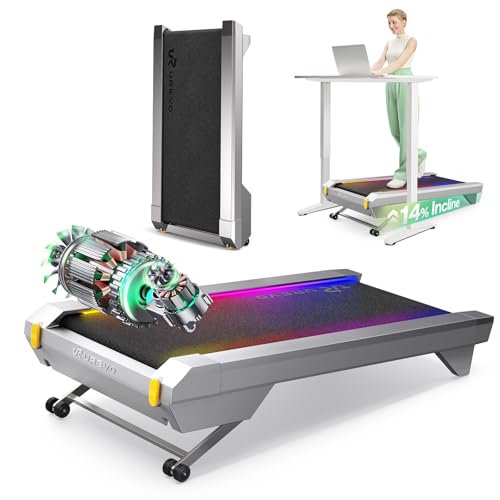
The UREVO CyberPad Smart Walking Pad makes the most sense for people who want a walking treadmill with more training range than a basic flat under-desk model.
Its strongest case is for home-office users, apartment walkers, and anyone who wants steady daily movement with a little more workout variety built in.
Verdict: this is a feature-rich walking pad for buyers who value incline, quieter operation, and app support more than minimalist simplicity. If you want a treadmill mainly for easy walking while you work, the CyberPad is aimed at that use case.
If you want a machine that also feels more intentional for structured exercise, the extra hardware and software features give it a clearer identity than many generic walking pads.
Review Scorecard
Category
Score
Buyer assessment
Walking desk usability
9/10
Built around home-office movement, with a low-noise brushless motor and a design meant for standing-desk use.
Workout flexibility
9/10
The 14% auto incline gives it more training range than a flat walking pad.
App experience
8/10
The app adds auto-logging, route-style visuals, goals, and music syncing for more structured routine building.
Noise and shared-space fit
8/10
Listing claims under 35 dB operation, which supports use in quieter homes or offices.
Durability focus
8/10
The brushless motor and long-life positioning suggest the product is built for sustained use.
Space-conscious design
7/10
It is still a treadmill, so it will take more planning than a simple mat or pedal device, but the form factor is aimed at desk placement.
Key Features and Specifications of CyberPad Smart Walking Pad
At a high level, the CyberPad is a brushless-motor walking pad with auto incline, app integration, and a design that tries to serve both workday movement and more deliberate exercise.
The listing positions it as a home-office fitness tool rather than a heavy-duty running treadmill.
Here are the most useful evidence-based details:
Brand and model: UREVO CyberPad Smart Walking Pad
Primary use case: under-desk walking, home-office fitness, and light structured cardio
Motor: 2.5HP sealed brushless motor
Noise claim: less than 35 dB
Incline: 14% auto-adjustable incline
App support: UREVO smart app with auto-logging, mapped routes, AI music, and goals
Surface: spacious walking surface
Controls: digital controller
Design language: elegant speed lights and award-oriented positioning
The brushless motor is the standout mechanical detail.
UREVO frames it as a durability play, with claims about longer service life and less maintenance than brushed designs.
For a treadmill that may sit in a home office and get regular daily use, that is a meaningful selling point because the main question is not just how it performs on day one, but how well it handles repeated short sessions over time.
The incline system is the other major differentiator.
A flat walking pad can be useful, but a 14% auto incline changes the feel of the machine.
It gives buyers a more demanding walking option without requiring a separate fitness machine.
That matters if you want a walking pad that can be used for calorie-focused sessions as well as casual movement breaks.
The software layer is more ambitious than what many buyers expect from a walking pad.
The app promises auto-logging for distance, time, calories, and speed, plus visual route-style experiences and goal tracking.
That does not replace the fundamentals of the machine, but it can help people stay consistent if they like feedback and progression.
Pros and Cons of CyberPad Smart Walking Pad
Pros
14% auto incline adds real workout variety. This is the most persuasive feature if you want more than level walking.
Brushless motor design suggests a durability-first approach. The listing emphasizes longevity and reduced wear.
Quiet operation is suited to shared spaces. A low-noise treadmill matters in apartments, offices, and shared homes.
The app gives the product a stronger habit-building angle. Auto-tracking and goals can make daily use easier to sustain.
It is positioned for standing-desk use rather than being a compromise product. That clarity helps buyers understand the intended role.
Cons
It is still a treadmill, so it demands space and placement planning. Even a smart walking pad is not as effortless to store as smaller fitness accessories.
The feature set may be more than casual walkers need. If you only want to stroll occasionally, some of the tech can feel unnecessary.
The listing language is heavy on claims and light on practical limits. Buyers may need to pay close attention to dimensions, weight, and setup details elsewhere.
Automation and app features add value only if you use them. People who prefer a simple manual machine may not care about the software layer.
This product fits best if you want a walking pad that does more than occupy the space under a desk.
It is a good match for remote workers, home-office users, and people trying to build consistent walking habits without giving up workout progression. The incline and app features make it especially appealing to buyers who want measurable daily movement, not just a passive treadmill surface.
It also makes sense for apartment dwellers or anyone who needs a quieter machine.
The under-35 dB claim and brushless motor positioning point toward a design that should be easier to live with in shared spaces than louder gym-style equipment.
If your workout windows are early, late, or in the middle of work hours, that matters.
You should probably skip it if you want the simplest possible walking machine.
Someone who only needs an occasional low-speed walk may not benefit from the incline system, the app, or the more ambitious feature set.
It is also not the obvious choice if you need a machine mainly for running rather than walking and light cardio.
Workout Experience and Daily Use
Incline Changes the Use Case
The 14% auto incline is what makes the CyberPad feel like a true fitness product instead of a flat desk treadmill.
It can turn short walking sessions into something more demanding, which is useful for buyers who want to nudge heart rate and effort without changing equipment.
Noise Matters More Than Marketing
For a treadmill intended for work-from-home use, noise is part of the product.
The listing claims under 35 dB and compares the sound level to typing.
That is the right category of promise for a desk treadmill, because the real value is whether you can keep moving without turning every meeting into an equipment test.
App Features Support Consistency
The app is built around tracking and gamification: it logs activity, simulates mapped routes, and supports goals.
That is not essential to the treadmill’s physical function, but it can be genuinely useful for people who like feedback loops and visible progress.
Design Choices Favor Daily Habit Building
The speed lights, spacious surface, and digital controller all point to a product that wants to feel polished rather than purely utilitarian.
That does not make it better by itself, but it helps explain the target buyer.
This is a walking pad for people who want the machine to invite use, not merely exist in a corner.
If you want to compare before buying, these are sensible Amazon search alternatives:
WalkingPad if you want a well-known walking-pad line with a simpler, more established category identity.
UREVO walking pad if you want to stay within the same brand and compare flatter or more basic options.
Sperax walking pad if you want another compact under-desk treadmill option with broad Amazon availability.
DeerRun walking pad if you want to compare app-driven compact treadmills in the same general category.
The key comparison point is whether you want incline and software features, or whether a simpler walking pad will do the job.
Buyers who care most about low-friction daily movement may lean toward the most straightforward option.
Buyers who want more training variety should compare closely against models that also emphasize incline and app support.
Is CyberPad Smart Walking Pad Worth It?
Yes, if you want a walking pad that is built around more than casual strolling. The UREVO CyberPad Smart Walking Pad is most compelling for home-office buyers who want quiet operation, incline-based workouts, and app-supported consistency in one machine.
If your priority is a smarter, more featureful walking treadmill for regular use, this model has a clear argument.
If you just need a basic flat walking surface, the extra capability may be more than you need.